Find your recipe keeper
CookBook vs Paprika
CookBook is our pick over Paprika 3 for saving recipes from social media and paper, getting recipe-aware AI help and planning in a web browser. Keep the recipes you love, then add those tools across iOS, Android and web.
Free for 20 recipes. Available on iOS, Android & web.
The decision
CookBook is our Paprika alternative for social imports, scanning and web planning
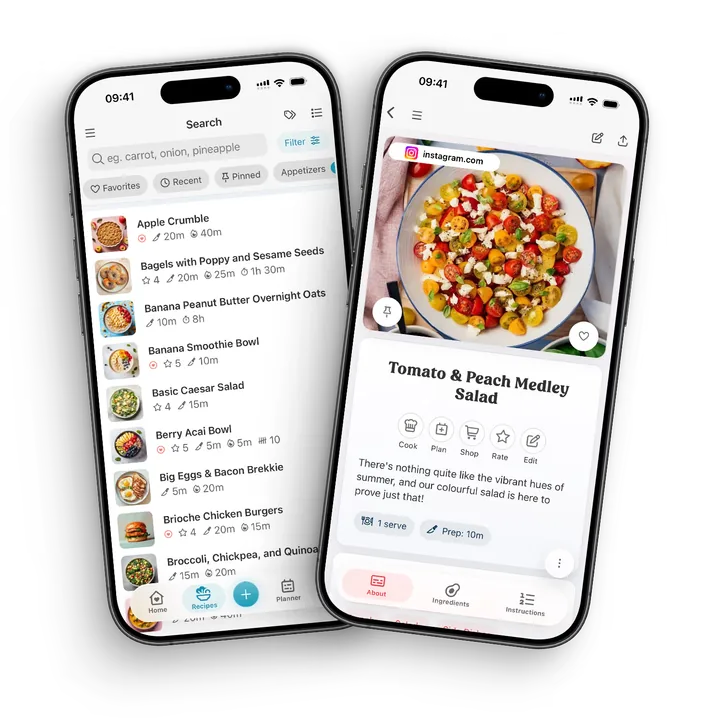
Save supported Instagram and TikTok recipes, scan handwritten favourites and use the same editable collection to plan, shop and cook on mobile and web. Ask CookBook adds help with the recipe you chose. Paprika 3 remains a strong fit for native desktop apps, pantry records and reusable menus; CookBook is our recommendation when you want these extra ways to save and use your recipes.
Where CookBook stands out
- Save supported social links and scan written recipes into the same editable collection.
- Ask about a saved recipe, develop a variation and calculate estimated nutrition with Pro.
- Use mobile and the full web app without separate desktop licences.
Watch out for
- Paprika 3 needs separate platform purchases; its bookmarklet is not a browser recipe library.
- Paprika has stronger dedicated pantry tracking and established native desktop tools.
- Both apps can export recipes. File format, images and non-recipe data still need checking before a move.
Jump to a feature
A better fit for your routine
Why consider a Paprika alternative?
Choose CookBook when your next recipe comes from Instagram, TikTok or a handwritten card, or when you want to plan on a computer without installing another app. Supported Paprika archives can move with Pro import assistance.
- Your recipe collection has outgrown website clipping: you also want to save social posts and scan handwritten cards.
- You want to organise recipes and plan meals in a browser without buying another platform licence.
- You want to ask questions about a saved recipe and calculate nutrition for your own adapted version.
From inspiration to dinner
What makes CookBook different
CookBook adds supported social importing, written-recipe scanning and a full web planner to the recipe collection you already use. Ask CookBook can help you adapt a saved dish, so a familiar favourite can become tonight's variation.
- A home for the recipes a browser clipper misses
- Bring supported social posts and written-recipe scans alongside website recipes. Ingredients and instructions become editable parts of your collection, ready for planning and shopping. Explore recipe importing
- Your recipe collection, open in a browser
- Use the full CookBook web app to edit recipes, plan meals and prepare shopping lists. Paprika 3 has native computer apps, but no equivalent browser library. See the web app
- Help with the recipe you actually want to cook
- Ask CookBook about the selected dish or use AI Chef to develop an idea. Review a variation before saving it. This extends the recipe beyond manual edits and serving adjustments. Meet the AI cooking tools
- A useful record of what made dinner work
- Follow focused steps, use timers and supported narration, then record the cook and your notes. Your collection becomes a record of the meals worth making again. Explore cooking mode
At a glance
Strong: a clear fit for this task. Limited: restrictions or extra steps. Not available: absent from the version or platform named. Read each note for plan and device details.
| Features | CookBook | Paprika 3 |
|---|---|---|
| Best fit | Mixed-source recipe collection Bring supported social saves, written recipes and your own notes into one library, then organise, plan, shop and cook from it. | Native desktop and pantry workflow Native desktop applications, dedicated pantry data and reusable menus suit an established, structured collection. This comparison covers Paprika 3. |
| Devices | Strong iOS, Android and web One account covers supported iOS, Android and web use. CookBook has a browser app rather than native Mac or Windows desktop software; the web app needs internet. | Strong iOS, Android, Mac and Windows Installed applications on each platform are sold separately and connected by cloud sync. The saving bookmarklet is not a full browser recipe library. |
| App languages | Strong 7 app languages English, French, German, Italian, Spanish, Polish and European Portuguese. The app language is separate from the website language. | Strong 16 languages on Windows Paprika 3 lists 16 Windows interface languages, including Polish. Its natural-language ingredient parser and automatic aisle assignment are English-only. |
| Website and social saving | Strong Supported links Import supported websites, Instagram, TikTok and Facebook sources. Check the accessible ingredients and method; a missing source quantity should not be invented. | Limited Web browser and clipper Website downloading plus manual field clipping, Safari sharing and a bookmarklet. Use a full linked recipe where social content cannot be captured through that route. |
| Written recipe scanning | Strong Included; limits by plan An integrated scanner turns photographed written recipes and selected PDF pages into editable fields. Free smart-import limits apply; review difficult handwriting. | Limited Use text entry or a separate scan tool Paprika 3 documents attached photos and text entry; a separate OCR tool can supply text to paste. Do not count a future version’s scanning as included here. |
| Plan meals and shop | Strong Included; limits by plan Plan saved recipes and create editable lists. The free plan allows 2 shopping lists; pantry quantities and leftover stock are not automatically tracked. | Strong Included Calendar, reusable multi-day menus, aisle-sorted groceries and pantry-based exclusions are established strengths. |
| Cooking tools | Strong Cooking mode Focused steps, text-size controls, timers and recorded cooking history. Read-aloud and voice support depend on device capabilities and permissions. | Strong Timers and recipe progress Detected timers, ingredient cross-off, direction highlighting, scaling, screen-awake settings and pinned recipes for moving between dishes. |
| Recipe nutrition | Strong Pro calculation Pro estimates nutrition from ingredients and servings. Recalculate after editing; results are estimates rather than laboratory measurements. | Limited Imported or entered information Store values from the source or enter your own. A saved panel does not establish a new calculation after changing the ingredients. |
| Export and moving recipes | Strong Export and supported bulk imports Export Text, PDF or CookBook ZIPs. Images reference CookBook servers: import photos into the next app before deleting the account. Pro assistance handles supported third-party archives. | Strong Recipe-file and HTML export Exports are available: HTML gives a readable collection; .paprikarecipes is the native recipe archive. Keep all export assets. CookBook accepts supported Paprika files through Pro assistance. |
| Free option | Limited 20 recipes and 20 smart imports Keep 20 recipes, use 20 smart imports and 2 lists. A 14-day trial is available with yearly Pro; monthly and yearly conditions differ. | Limited Platform-dependent trials Windows trial: 50 recipes, no cloud sync and no time limit. Trial conditions are not the same across every platform. |
| Price basis, checked September 2026 | Pro: US$39.99/year US$6.99/month is also offered. Amounts are indicative USD; your country, store and current checkout offer apply across supported devices on one account. | Separate one-time platform purchases US examples: iOS US$4.99; Windows US$29.99. Buy the needed Paprika 3 platforms separately. Announced Paprika 4 new-feature subscriptions are a different offer. |


Scroll sideways to compare all apps
Compare the detail
Website recipes and social saves need different tools
| Features | CookBook | Paprika 3 |
|---|---|---|
| Recipe website capture | Strong Links and browser sharing | Strong Browser download and clipping |
| Social-source workflow | Strong Dedicated supported imports | Limited Use the accessible recipe page |
Scroll sideways to compare all apps
Choose CookBook if a typical week starts with a food blog, an Instagram save and a TikTok dinner idea. Its supported social import routes and website imports bring those sources into one editable recipe collection, rather than leaving your inspiration divided between saved-post folders.
Paprika 3 is particularly useful for conventional recipe websites: its browser downloader and manual clipping tools let you select the fields when automatic extraction fails. For a social post that points to a complete website recipe, follow that page into the importer. CookBook also offers dedicated routes for supported social posts when your starting point is the post itself.
The verdict
CookBook is the better starting point for mixed website and social collections; Paprika 3 remains capable for food-blog recipes.
Compare the detail
Turn family cards into editable recipes
| Features | CookBook | Paprika 3 |
|---|---|---|
| Written recipe capture | Strong Integrated recipe scanner | Limited Text entry or separate OCR |
| Original photograph | Strong Keep with the recipe | Strong Attach recipe photos |
Scroll sideways to compare all apps
CookBook’s scanner starts with written recipe text in a photograph, screenshot or selected PDF page. That matters when your collection includes handwritten cards as well as online recipes: ingredients and instructions become fields you can edit, search, scale and send to a shopping list.
Paprika 3 documents text entry and recipe photos. Attaching a photograph preserves the original, but does not by itself turn the writing into ingredient fields. You can use a separate text-recognition tool and paste its output into Paprika. For either workflow, preserve the original image and resolve ambiguous fractions before treating the transcription as ready to cook.
The verdict
Choose CookBook when scanning is a regular part of building your library, especially for a box of family recipes.
Compare the detail
Find the recipe again, not just its bookmark
| Features | CookBook | Paprika 3 |
|---|---|---|
| Find by ingredient | Strong Ingredient search and filters | Strong Ingredient search |
| Organise personal favourites | Strong Tags, ratings and notes | Strong Categories, ratings and notes |
Scroll sideways to compare all apps
CookBook brings tags, favourites, ratings and personal notes into the same collection. A useful structure can combine a family name, a weeknight tag and an ingredient search, so one dish is easy to retrieve in several contexts. Record your own changes instead of saving a second unexplained copy.
Paprika 3 supports multiple categories, subcategories and searching across ingredients, directions, notes and source fields. That is a genuine strength for an established, carefully organised library. A hierarchy such as Dinner then Vegetarian may suit you better than a flatter tagging habit; neither approach needs every recipe forced into a single folder.
Make CookBook comfortable to return to: choose a colour scheme, light or dark appearance, text size and which home sections stay visible. Ratings, notes and recorded cooking history help you find the version your household liked.
The verdict
Choose CookBook for a flexible mixed-source collection; keep Paprika in contention if your nested categories already work well.
Compare the detail
Get help that knows which recipe you mean
| Features | CookBook | Paprika 3 |
|---|---|---|
| Recipe-aware conversation | Strong Ask CookBook | Not available Not part of Paprika 3 |
| Keep control of changes | Strong Review, then save or update | Strong Manual recipe editing |
Scroll sideways to compare all apps
Ask CookBook can work with a selected recipe when you want a substitution, a quicker variation or a different dinner idea. You can continue the conversation, review the draft, then decide whether to save a new recipe or update the original. AI Chef starts a recipe idea from your ingredients or preferences.
Paprika 3’s documented workflow centres on collecting and editing your recipes. Scaling adjusts quantities; recipe-aware assistance can help you think through a change to the dish. Paprika 4 has separately announced subscription features, so check the version and plan before buying for those additions. CookBook suggestions still need your review of quantities, method and dietary requirements.
The verdict
Choose CookBook if you want recipe-aware assistance within the collection you already use, without making AI part of every cooking session.
Compare the detail
Build a repeatable week from your own recipes
| Features | CookBook | Paprika 3 |
|---|---|---|
| Recipe meal calendar | Strong Day, week and month | Strong Day, week and month |
| Repeat a successful plan | Strong Copy a date range | Strong Reusable multi-day menus |
Scroll sideways to compare all apps
CookBook lets you schedule saved recipes, set servings, move a meal and copy a useful date range. Browser access is helpful when you want to see the week on a larger screen and then open the same plan from your phone. Your own recipes remain the starting point.
Paprika’s reusable menus are worth considering for repeating a holiday dinner or a multi-day plan. They sit alongside its calendar workflow. In either app, distinguish a second serving of an already-cooked batch from a fresh batch: a calendar entry does not track how much food remains in your fridge. CookBook does not automatically track leftover stock.
The verdict
CookBook suits flexible planning across mobile and browser; Paprika has an advantage if reusable menu collections are central to your routine.
Compare the detail
Know what the shopping list will, and will not, do
| Features | CookBook | Paprika 3 |
|---|---|---|
| Recipe shopping lists | Strong Editable lists and merges | Strong Combined ingredients and aisles |
| Pantry-based exclusions | Limited Remove pantry items yourself | Strong Dedicated pantry integration |
Scroll sideways to compare all apps
CookBook can turn selected recipes or planned meals into an editable shopping list. Review merged amounts, split ingredients that should stay separate and add regular groceries. Eligible lists can connect to Instacart in supported parts of the United States and Canada; this is a regional option, not worldwide delivery.
Paprika combines similar ingredients, groups groceries by aisle and maintains a dedicated pantry with quantities and dates. Pantry ingredients can be excluded when building a list. CookBook asks you to remove what you already have yourself. Paprika has the advantage if keeping a pantry inventory is your main goal.
The verdict
Choose CookBook for editable recipe-to-shopping lists and supported grocery ordering; choose Paprika for dedicated pantry management.
Compare the detail
Stay with the step while dinner comes together
| Features | CookBook | Paprika 3 |
|---|---|---|
| Cooking progress | Strong Focused steps and larger text | Strong Cross-off and highlighting |
| Timers | Strong Timers from recipe instructions | Strong Detected recipe timers |
Scroll sideways to compare all apps
CookBook’s cooking mode offers larger text, step navigation, ingredients and recipe timers. Supported devices can read steps aloud and offer voice controls. After dinner, recording a cook updates the cook count and last-cooked date, while your rating and notes help the next attempt.
Paprika 3 has practical counter-side tools too: detected timers, ingredient cross-off, direction highlighting and pinned recipes for switching between dishes. It is not simply a storage app. The meaningful choice is whether you prefer its recipe-progress workflow or CookBook’s focused steps and recorded cooking history. Narration and screen-awake support still depend on the device and settings.
In CookBook, change the serving count and the ingredient quantities adjust. Choose original units or US, metric, imperial or Australian measurements. Cooking time does not scale automatically; weight-to-volume estimates depend on the ingredient.
The verdict
CookBook is a strong fit for guided steps and remembering what you cooked; Paprika is useful when juggling several pinned recipes.
Compare the detail
Stored nutrition is different from a new calculation
| Features | CookBook | Paprika 3 |
|---|---|---|
| Nutrition information | Strong Ingredient-based Pro estimate | Limited Imported or entered values |
| After an ingredient change | Strong Recalculate the estimate | Limited Review stored nutrition |
Scroll sideways to compare all apps
CookBook Pro estimates nutrition from the ingredient list and servings. That is useful when a family recipe has no nutrition panel or you have changed the recipe since importing it. Recalculate after changing ingredients or portions; the result depends on how accurately those ingredients are described.
Paprika stores nutritional information entered by you or supplied by a source website. The saved panel stays with the recipe, but changing an ingredient does not recalculate those values. CookBook Pro can give you a fresh estimate for the version you plan to cook.
CookBook also lets you enter your own recipe nutrition values. Pro adds personal calorie and macro targets. Planner totals start with one consumed serving per planned recipe, so adjust the portions you expect to eat rather than assuming the whole dish counts.
The verdict
Choose CookBook Pro when you want ingredient-based estimates for recipes you create or adapt.
Compare the detail
Browser flexibility or native desktop software?
| Features | CookBook | Paprika 3 |
|---|---|---|
| Full browser library | Strong Included web app | Not available No full browser library in Paprika 3 |
| Native Mac or Windows app | Not available Use the browser instead | Strong Dedicated desktop applications |
| Offline recipe reading | Limited Previously synced recipes | Strong Native-device recipe library |
Scroll sideways to compare all apps
CookBook works on iOS, Android and the web under one account. The web app gives you recipe editing, organisation, planning and shopping without buying a separate computer licence. Paprika offers installed iOS, Android, Mac and Windows apps, each sold separately; its bookmarklet saves recipes but is not a full browser library.
Connectivity is an important tradeoff. CookBook mobile apps can show recipes already synced to the device and cached lists, but editing, imports and AI require a connection. Its web app needs internet access. Choose the device you actually use at the kitchen counter, and download or sync the recipes before travelling instead of treating cloud sync as a guarantee of offline availability.
The verdict
Choose CookBook for full browser access; choose Paprika when an installed Mac or Windows recipe manager is essential.
Compare the detail
Compare the devices and version you are buying
| Features | CookBook | Paprika 3 |
|---|---|---|
| Initial trial or free use | Limited 20 recipes and smart imports | Limited Trial depends on platform |
| Paid model | One Pro account plan | Paprika 3 platform purchases |
Scroll sideways to compare all apps
CookBook starts with 20 saved recipes, 20 smart imports and 2 shopping lists. Pro guide prices are US$6.99 monthly or US$39.99 yearly; the yearly plan offers a 14-day trial. The account covers supported mobile and web use, while country, store and offer conditions determine your checkout price.
Paprika 3 uses separate platform purchases. Current US examples are US$4.99 for iOS and US$29.99 on its Windows page, so add up the platforms you need before comparing the total. Paprika’s announcement says version 4 will charge a subscription for new features, while existing users retain their existing features without subscribing. That distinction matters before making a long-term price comparison.
The verdict
Choose CookBook for one mobile-and-web plan and a free starting collection; Paprika 3 may cost less when you need only one purchased platform.
Compare the detail
Send a recipe copy or keep one library synced
| Features | CookBook | Paprika 3 |
|---|---|---|
| Share an individual recipe | Strong Text, PDF, native file or link | Strong Email or iOS AirDrop |
| Sync a common collection | Strong Devices using one account | Strong Devices using one sync account |
Scroll sideways to compare all apps
CookBook can send a recipe as text, PDF or a native recipe file, with links and QR codes for sharing with another CookBook user. Paprika supports recipe sharing by email and AirDrop on iOS. Send a copy when a friend wants your recipe but should keep their own edits.
CookBook and Paprika 3 can sync a collection across devices using the same account. That differs from exchanging a recipe between separate accounts: edits to a shared account affect its collection, while a sent copy is independent. CookBook does not provide linked household profiles. Decide whether you want one common library or private collections with selected recipes passed between them.
Paprika 4’s announced premium family sharing adds subaccounts with separate credentials and shared household data. That differs from the Paprika 3 account setup compared here. If independent household logins matter to you, include this version 4 feature when deciding.
The verdict
Choose CookBook for flexible individual recipe sharing; choose the account setup deliberately in either app, because a sent copy is not a live shared library.
App language and recipe language
Choose the language you actually cook in
| Features | CookBook | Paprika 3 |
|---|---|---|
| App interface languages | Strong 7 app languages: English, French, German, Italian, Spanish, Polish and European Portuguese | Strong 16 languages on Windows. Paprika 3 lists 16 Windows interface languages, including Polish. Its natural-language ingredient parser and automatic aisle assignment are English-only. |
Scroll sideways to compare all apps
CookBook works in English, French, German, Italian, Spanish, Polish and European Portuguese. Use the app in your preferred language, then decide whether to translate a recipe. Changing the website language does not change the app or rewrite your collection.
Paprika 3 lists 16 Windows interface languages, including Polish. Its natural-language ingredient parser and automatic aisle assignment are English-only.
CookBook’s optional automatic import translation is off until enabled and supports its six non-English app languages. With Pro, the saved-recipe Translate tool can also translate into English. Review the translated ingredients and method before saving; translation and measurement conversion are separate choices.
The verdict
Check your actual language and device, not just the language count. CookBook combines seven app languages with optional recipe translation.
Your decision
Who should choose which app?
Choose CookBook for social recipes, built-in scanning and browser planning alongside your existing favourites. Choose Paprika 3 when native desktop apps, pantry records and reusable menus are the features you rely on most.
- Choose CookBook if…
- Choose CookBook if you save social recipes, scan family cards, want browser planning and would use recipe-aware AI. It is the stronger all-round fit for a collection that starts in several places and ends at the dinner table. Try CookBook with your own recipes
- Choose Paprika if…
- Choose Paprika 3 if installed Mac or Windows software, pantry inventory and reusable menus are your priorities. Its per-platform purchase can suit someone who only needs one platform. You do not need to abandon a system that already covers those needs.
Keep the recipes you love
Switching from Paprika to CookBook
| Features | CookBook | Paprika 3 |
|---|---|---|
| Bulk recipe export | Strong Text, PDF or native ZIP | Strong HTML or .paprikarecipes |
| Moving recipe photographs | Limited Import linked images before deleting | Strong Keep the HTML archive with images |
Scroll sideways to compare all apps
You can start with a few favourites before moving the rest. Use the route below for Paprika, then check the imported recipes against your originals.
CookBook also exports your collection. Its export images are links to hosted files, so preserve the image copies before deleting a CookBook account.
The verdict
Start CookBook with your existing recipes, keep your original Paprika archive and confirm the collection before making a permanent switch.
Save your Paprika export
Keep an untouched HTML ZIP with its images, or a .paprikarecipes archive. Use Paprika’s Export option rather than copying recipe screenshots.
Choose the supported transfer route
CookBook Pro import assistance accepts those Paprika files. Self-service is for CookBook CSV or .cookbook ZIP files, up to 250 recipes per file.
Check the recipes that matter most
Compare photos, quantities, servings, ingredient groups, notes and categories with the originals. Preserve pantry and calendar records separately.
Make your next dinner in CookBook
Tag a favourite, add it to the planner and build its shopping list. Keep the original archive until the full collection is accounted for.
A little more help
Frequently asked questions
Is CookBook a good Paprika alternative?
Yes. CookBook is our recommended Paprika 3 alternative for supported Instagram and TikTok imports, written-recipe scanning, recipe-aware AI and meal planning in a full web app. It works across iOS, Android and web, with Pro assistance for supported Paprika recipe archives. Paprika 3 remains a strong choice for native desktop apps, pantry records and reusable menus.
Can Paprika 3 sync between iPhone, Android and a computer?
Yes. Paprika Cloud Sync connects its supported installed apps. Each platform version is purchased separately; browser clipping is not a full browser-based recipe manager.
Does Paprika have cooking tools?
Yes. Paprika 3 has timers, ingredient scaling, ingredient cross-off and step highlighting. CookBook also has cooking mode; compare the controls on the device you use in the kitchen.
Does Paprika require a subscription?
This guide compares Paprika 3’s separate platform purchases. Paprika has announced a subscription for new Paprika 4 features after beta. Existing users can retain their previous features without subscribing; final subscription pricing has not been announced. Check the current official terms before purchasing.
Read Paprika’s current announcement Can I transfer recipes from Paprika to CookBook?
Yes. CookBook’s Pro import assistance accepts Paprika HTML in a ZIP with images or .paprikarecipes files. Keep your original archive and confirm recipe fields and photos after import; do not assume pantry records or meal-plan history transfer with recipe files.
Check supported transfer formats Can I try CookBook before subscribing?
Yes. The free plan includes 20 saved recipes, 20 smart imports and 2 shopping lists. The yearly Pro plan offers a 14-day trial.
Compare CookBook plansStill have a question? Visit our help centre.
Loved in real kitchens
Home cooks, in their own words.
From the first saved recipe to a collection of thousands. Here’s what CookBook customers have to say.
Swipe to read more, or use the arrows.
Bring your Paprika favourites into CookBook
Keep the recipes you love and add social saving, scanning and browser planning to your routine. Start free with 20 recipes, 20 smart imports and 2 shopping lists; Pro import assistance can help with your Paprika archive.
Get CookBook free