A little more organised. A lot more cooking.
Calculate recipe nutrition
Estimate calories and macros for the recipes you save, scan or create. CookBook Pro calculates nutrition from your ingredients, with per-serving values you can review and keep alongside each recipe. You can save up to 20 recipes free; automatic nutrition calculation requires CookBook Pro.
Free for 20 recipes. Available on iOS, Android & web.

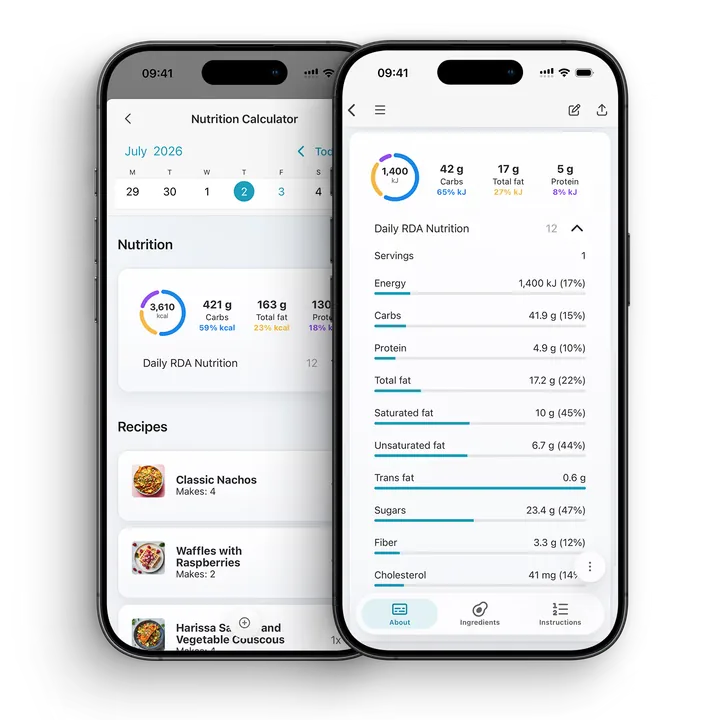
Nutrition
Estimate nutrition for recipes
Open a recipe, choose Edit and use Calculate nutrition in the Nutrition section. Check the ingredients, quantities and recipe servings first: CookBook calculates an estimate and saves the result per serving.
Start by saving one recipe, then check its ingredients and serving count. Automatic nutrition calculation is a CookBook Pro feature; saving a recipe in the free allowance does not include that calculation.
- Review energy in calories or kilojoules, alongside carbohydrates, fat and protein.
- Expand the nutrition details to see other available values and their serving context.
- Edit or paste your own nutrition information when you already have it.
- Save the recipe to keep its nutrition information with the ingredients and method.
Personal targets
Your recipes. Your nutrition goals.
With CookBook Pro, set your own daily calorie, carbohydrate, fat and protein targets in Settings. Choose calories or kilojoules, then use your saved recipe nutrition to put the day’s meals in context.
Open the planner’s nutrition summary and adjust the portions you expect to eat. The summary starts with one serving per recipe until you change it; it is a planning tool, not automatic food tracking.
- Calculate an estimate from a recipe’s ingredients and servings.
- Enter or edit nutrition values you already have.
- Compare planned portions with your personal calorie and macro targets.

Adjust
Changed the recipe? Recalculate its nutrition.
An ingredient swap changes what goes into the recipe. Update the ingredients and serving count, run Calculate nutrition again, then review and save the new result. Editing ingredients alone does not refresh a saved estimate.
- Ingredient swaps. Review the new quantity and ingredient name before calculating again.
- Servings. Check how many portions the complete recipe makes so the per-serving estimate is meaningful.
- Recipe variations. Save the version you want to cook, then review its nutrition.
- Meal planning. Saved recipe nutrition can contribute to daily calories and macro totals in your planner.
Practical guide
Nutrition as useful context
Use nutrition estimates as planning context, not as a clinical measurement. Ingredient data, brands, quantities and serving sizes can affect results, so CookBook keeps the estimate near the recipe details you can review.
A little more help
Frequently asked questions
Can CookBook calculate nutrition for my recipes?
Yes. In CookBook Pro, open a recipe, choose Edit and tap Calculate nutrition in the Nutrition section. Review the ingredients, quantities and servings, then save the per-serving estimate with the recipe.
See plans and pricing How accurate is a recipe nutrition calculator?
Nutrition results depend on ingredient data, brands, quantities and serving sizes. Treat estimates as useful planning guidance and review the recipe details carefully.
Can I use CookBook nutrition estimates for medical advice?
No. Nutrition estimates are not medical advice and are not a substitute for a doctor, dietitian or qualified health professional.
Can I change servings or ingredients?
Yes. After changing ingredients or the recipe’s serving count, calculate nutrition again and review the result before saving. Editing ingredients alone does not refresh a saved estimate.
Can nutrition help with meal planning?
Yes. Nutrition estimates can help you compare recipes and plan meals with more context, especially when you are balancing portions or macros.
Will imported recipes include nutrition automatically?
Some sources include nutrition information and others do not. Review what was imported. If it is missing, you can enter your own values or use CookBook Pro to calculate an estimate from the ingredients and servings.
Can I calculate nutrition for scanned recipes?
Yes. Once a scanned recipe has clean ingredients and servings, it can be used like other recipes in CookBook for planning and nutrition estimates.
Does CookBook support calories and macros?
Yes. The recipe nutrition view can show calories or kilojoules plus carbohydrates, fat and protein. Additional nutrition details appear where values are available.
Can I set my own calorie and macro targets?
Yes. In Settings, choose your daily calorie, carbohydrate, fat and protein targets. Use the planner nutrition summary to review planned portions against those targets. Targets describe your goals; editing them does not change the recipe’s actual nutrition.
Still have a question? Visit our help centre.
Try the nutrition workflow with one recipe.
Save a recipe, check its ingredients and servings, then calculate and review its nutrition with CookBook Pro. The app is free to try with up to 20 saved recipes; automatic nutrition calculation requires Pro.
Get CookBook and explore Pro