Find your recipe keeper
CookBook vs ReciMe
CookBook is our pick over ReciMe when you want to turn social recipes into meals you can plan on your computer and cook on your phone. Full web planning, reusable tags and whole-library backups keep your saved recipes useful beyond the first import.
Free for 20 recipes. Available on iOS, Android & web.
The decision
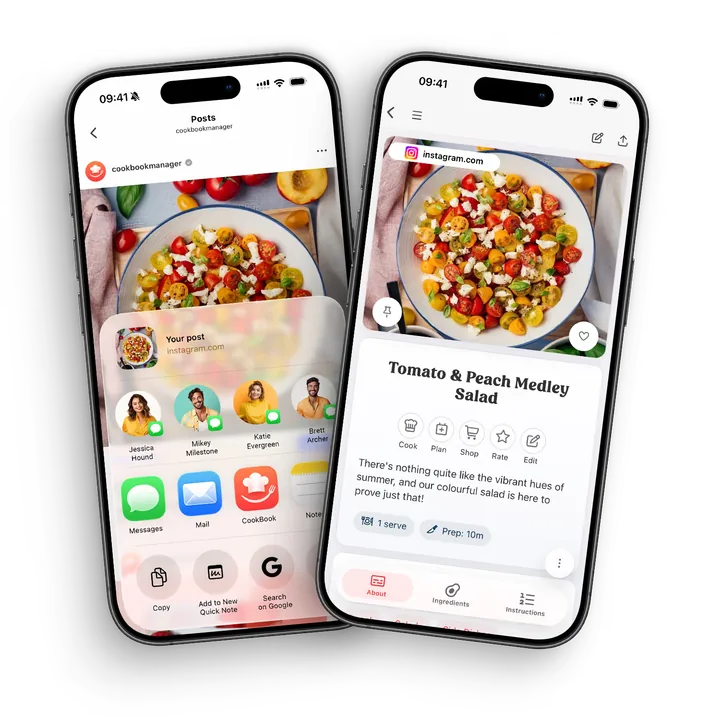
CookBook is our ReciMe alternative for full web planning and recipe backups
Choose CookBook to save supported social recipes, organise them with reusable tags and plan meals and shopping lists on your computer as well as your phone. Keep a whole-library backup as the collection grows. Both apps support social importing; ReciMe's renewed weekly free-import allowance is a useful alternative for light savers with a mobile planning routine.
Where CookBook stands out
- Plan meals and prepare shopping lists on your computer as well as your phone.
- Find recipes with reusable tags, ingredient searches and your own cooking notes.
- Export the whole collection, including after moving back to the free plan.
Watch out for
- ReciMe’s meal planner and grocery lists are still mobile-only in its documented web beta.
- ReciMe offers individual PDF exports in Plus; a complete structured-library export is not documented in that guide.
- ReciMe’s renewed allowance of 5 imports per week may suit light savers better than CookBook’s 20-recipe free limit.
Jump to a feature
A better fit for your routine
Why consider a ReciMe alternative?
Move to CookBook when you want your saved Reels alongside family recipes, a meal plan you can edit in a browser and a backup of the whole collection. Both apps support social imports; compare what you want to do with the recipe after saving it.
- You want to plan meals and prepare grocery lists on your computer, features still listed as coming soon in ReciMe’s web beta.
- You want reusable tags and ingredient-led searches to find a recipe without remembering its cookbook.
- You want an editable whole-library backup, beyond a set of individual recipe PDFs.
From inspiration to dinner
What makes CookBook different
CookBook gives the recipes you save a complete mobile-and-web routine: find a dish by ingredient or tag, plan dinner on your computer, shop from the list and cook from your phone. Its documented whole-library exports also give you a way to keep the collection you build.
- The whole week, on a bigger screen
- CookBook’s web app includes meal planning and shopping lists as well as recipes. Build a plan at your desk and use the same account from your phone. See the complete web workflow
- Find dinner by what you have
- Combine tags, favourites and ingredient searches. One dish can be both Weeknight and Vegetarian without another copy or a single folder to remember. Explore recipe organisation
- Cooking help beyond the open recipe
- Ask CookBook about a saved dish or start with a general cooking question. AI Chef develops ideas when you have ingredients but have not chosen a recipe yet. Explore the AI companion
- An exit route for the collection you build
- CookBook documents whole-library text, PDF and native-format exports. Keep the linked images before deleting an account. ReciMe’s individual PDF route is useful but is not a documented structured-library archive. See CookBook backup formats
At a glance
Strong: a clear fit for this task. Limited: restrictions or extra steps. Not available: absent from the version or platform named. Read each note for plan and device details.
| Features | CookBook | ReciMe |
|---|---|---|
| Best fit | Mixed-source recipe collection Keep social recipes, written recipes and personal notes together, then plan, shop and cook. | Social saving with a weekly free allowance A useful fit for light weekly importing, with planning and grocery lists on the free plan. |
| Devices | Strong iOS, Android and web Recipes, planning and shopping lists across mobile and browser. One account; browser access is not a native Windows or Mac application. | Limited iOS, Android and desktop web beta iOS and Android plus desktop web beta and a Chrome extension. The web beta has recipe importing and editing, but no meal planner or grocery lists yet. |
| App languages | Strong 7 app languages English, French, German, Italian, Spanish, Polish and European Portuguese. The app language is separate from the website language. | Strong 5 app languages English, Spanish, German, French and Portuguese are listed in ReciMe’s help centre. Italian and Polish are not in that published list. |
| Website and social saving | Strong Supported links Websites, Instagram, TikTok, Facebook and other supported sources; review the saved ingredients and method. | Strong Web and supported social links Instagram, TikTok, Facebook, Pinterest and YouTube. Public accessible pages are required for browser imports. |
| Written recipe scanning | Strong Included; limits by plan Photos, cookbook pages and handwritten recipes. Free smart-import allowance applies; Pro removes that allowance limit. | Strong Photos and cookbook scanning Photo import is supported; check the current Plus requirements for cookbook scanning. |
| Plan meals and shop | Strong Included; limits by plan Recipes feed your meal planner and editable shopping lists. Free plan allows 2 lists. | Limited Included in free mobile plan Meal plans and grocery lists are mobile features; the web guide lists them as coming soon. |
| Cooking tools | Strong Cooking mode Larger text, step navigation and timers; read-aloud support depends on the device. | Strong Guided cooking in Plus Step-by-step guided cooking is listed among premium features. |
| Recipe nutrition | Strong Pro estimates and planner macros Estimate recipe nutrition, save it to daily planner totals and set custom macro targets. Recalculate after recipe edits and refresh percentages after changing goals. | Strong Plus calculation Plus calculates recipe nutrition. Values depend on saved ingredients and servings; check your own changes before relying on an estimate. |
| Export and moving recipes | Strong Export and supported bulk imports Whole-library text, PDF and native CookBook backups, including on the free plan. Images remain server links: copy them before account deletion. CSV imports cover core fields, with a 250-recipe self-service limit. | Limited PDF export in Plus Plus exports individual recipes as PDFs and supports printing. The published guide does not document a structured whole-library archive; verify transfer formats before relying on one. |
| Free option | Limited 20 recipes and 20 smart imports Also includes 2 shopping lists. The yearly Pro plan offers a 14-day trial. | Limited 5 imports per week The official free-plan guide also advertises a 7-day Plus trial. |
| Price basis, checked September 2026 | Pro: US$39.99/year US$6.99/month is also offered. Indicative USD; the in-app country, store and offer price applies. | Plus: check checkout offer The US store lists several Plus purchase amounts without identifying their billing periods. Check period and renewal price in checkout. |


Scroll sideways to compare all apps
Compare the workflow
Save social finds and website recipes, then check the result
| Features | CookBook | ReciMe |
|---|---|---|
| Instagram and TikTok recipes | Strong Supported imports | Strong Supported imports |
| Website recipe pages | Strong Supported accessible recipe pages | Strong Supported public recipe pages |
Scroll sideways to compare all apps
CookBook and ReciMe turn supported social and website recipes into editable collections. Both cover Instagram, TikTok and Facebook; ReciMe also lists Pinterest and YouTube. CookBook connects the saved result with tags, planning and personal notes.
Both depend on access to the source. ReciMe explicitly requires public pages for browser imports. Prefer the creator’s complete recipe when a post omits quantities, and check the ingredients and method before cooking.
The verdict
Both import supported social recipes. Choose CookBook to carry them into flexible organisation and planning across devices.
Compare the workflow
Bring handwritten recipes into the same collection
| Features | CookBook | ReciMe |
|---|---|---|
| Written-recipe photos | Strong Smart-import allowance; Pro | Strong Scanning in Plus |
| Manual recipe entry | Strong Editable recipes | Strong Free manual entry |
Scroll sideways to compare all apps
CookBook scans written recipes into editable ingredients and instructions, bringing family cards alongside online finds. ReciMe Plus also supports cookbook and handwriting scans and pasting recipe text; manual recipe entry remains free.
Include every page of the method, keep the original image, and check fractions or ambiguous handwriting. Reading a written recipe is different from recognising a finished dish: the dish photograph cannot reveal its exact ingredients.
The verdict
Both scan written recipes. CookBook is a practical home for family cards alongside social finds; compare the applicable allowances.
Compare the workflow
Organise by how you actually choose dinner
| Features | CookBook | ReciMe |
|---|---|---|
| Collection structure | Strong Reusable tags and filters | Strong Custom cookbooks |
| Find a saved dish | Strong Name and ingredient search | Strong Cookbooks and recipe categories |
Scroll sideways to compare all apps
CookBook combines tags, name and ingredient search, favourites, pins and personal notes. A curry can be both Weeknight and Vegetarian without two copies. Ingredient inclusion and exclusion help when you remember what needs using rather than the title.
ReciMe groups recipes into custom cookbooks with categories such as cuisine and diet. Choose between browsing themed folders and combining your own labels. In either collection, keep the note explaining what made a recipe worth cooking again.
Make CookBook comfortable to return to: choose a colour scheme, light or dark appearance, text size and which home sections stay visible. Ratings, notes and recorded cooking history help you find the version your household liked.
The verdict
Choose CookBook for overlapping tags and ingredient-led retrieval. ReciMe suits people who prefer browsing themed cookbooks.
Compare the workflow
Ask for a substitution, or start with an idea
| Features | CookBook | ReciMe |
|---|---|---|
| Questions about a saved recipe | Strong Ask CookBook | Strong Ask ReciMe in Plus |
| Start without selecting a recipe | Strong General questions and ideas | Not available Current recipe only |
Scroll sideways to compare all apps
Ask CookBook starts with a recipe, image or general cooking question. Explore a variation, review it and save a new recipe or update the original. AI Chef adds ideas; Dish Detector suggests a version of a photographed dish.
Ask ReciMe is a Plus feature for substitutions, simpler methods and questions about the open recipe. Its guide says it does not retain chat history. Review any suggested quantities and instructions before saving either assistant’s answer.
The verdict
Choose CookBook for recipe-specific help or a new cooking question. Ask ReciMe stays within the recipe already open.
Compare the workflow
Plan on the screen that gives you room to think
| Features | CookBook | ReciMe |
|---|---|---|
| Plan from saved recipes | Strong Day, week and month views | Strong Weekly mobile planner |
| Plan on a computer | Strong Web planner | Not available Not yet in web beta |
| Move plans across weeks | Strong Edit dates or move a range | Limited Remove and add again |
Scroll sideways to compare all apps
CookBook offers day, week and month views, servings per planned entry and date-range copying or moving. Build the plan on a computer and use it from your phone, with room to compare several dinners.
ReciMe’s mobile planner assigns recipes to meal slots and lets you drag meals within a week. Its guide says moving a meal into another week currently requires removing it and adding it again. Future weeks can still be planned; the limit is moving an existing entry between them.
The verdict
CookBook offers browser planning and easier date-range changes. ReciMe suits a mobile weekly routine.
Compare the workflow
Make a shopping list you can still control
| Features | CookBook | ReciMe |
|---|---|---|
| Recipe ingredients to a list | Strong Recipes or planned date range | Strong Recipes or automatic weekly plan |
| Prepare lists on the web | Strong Available | Not available Not yet in web beta |
Scroll sideways to compare all apps
CookBook creates an editable list from recipes or planning dates. Adjust quantities, split merged ingredients and add household items, on your computer or phone. Remove pantry items yourself.
ReciMe automatically connects weekly plans to groceries and carries scaled quantities into the list. It sorts by aisle, recipe, alphabet or newest addition. Both need a final review: fresh and dried herbs are not interchangeable, and retailer checkout depends on service availability.
The verdict
Choose CookBook for deliberate list editing across devices. ReciMe offers a useful automatically updated weekly list.
Compare the workflow
Keep the recipe readable while you cook
| Features | CookBook | ReciMe |
|---|---|---|
| Guided recipe steps | Strong Cooking mode | Strong Plus guided cooking |
| Ingredient quantities while cooking | Strong Linked amounts and ingredients | Strong Tap highlighted ingredients |
Scroll sideways to compare all apps
CookBook offers focused steps or scrolling, adjustable text, ingredients and timers. Read-aloud instructions and voice controls depend on the device. Recording a cook updates your history; opening the recipe alone does not.
ReciMe Plus includes guided cooking. Its tips describe keeping the screen on, tapping highlighted ingredients for adjusted quantities and tapping temperatures for conversions. Both help you follow the recipe without repeatedly returning to the ingredient list.
In CookBook, change the serving count and the ingredient quantities adjust. Choose original units or US, metric, imperial or Australian measurements. Cooking time does not scale automatically; weight-to-volume estimates depend on the ingredient.
The verdict
CookBook combines adjustable steps, timers and cooking history. ReciMe also offers guided cooking and in-step quantities.
Compare the workflow
Compare the recipe you will actually make
| Features | CookBook | ReciMe |
|---|---|---|
| Recipe nutrition calculation | Strong Pro estimates | Strong Plus calculator |
| Adjust serving quantities | Strong Recipe scaling | Strong Recipe scaling |
Scroll sideways to compare all apps
CookBook Pro estimates nutrition from ingredients and servings. Saved nutrition can feed daily calorie, fat, carbohydrate and protein totals in the planner, with targets you can customise. ReciMe Plus also provides a recipe nutrition calculator.
After a substitution or serving change, check the saved recipe before recalculating. Missing source quantities affect both shopping and nutrition estimates.
In CookBook, review Nutrition in the editor, calculate and save. Refresh the recipe after changing goals to update its displayed daily percentages.
CookBook also lets you enter your own recipe nutrition values. Pro adds personal calorie and macro targets. Planner totals start with one consumed serving per planned recipe, so adjust the portions you expect to eat rather than assuming the whole dish counts.
The verdict
CookBook connects recipe estimates to planner macros and personal targets. Both calculators need accurate ingredients and portions.
Compare the workflow
A web app needs more than a recipe viewer
| Features | CookBook | ReciMe |
|---|---|---|
| Mobile platforms | Strong iOS and Android | Strong iOS and Android |
| Browser extension | Strong Chrome | Strong Chrome |
| Desktop browser workflow | Strong Recipes, plans and lists | Limited Recipes and editing; beta |
Scroll sideways to compare all apps
CookBook has iOS, Android and browser access, plus a Chrome extension. Its web app includes recipes, planning and shopping lists.
ReciMe also has mobile apps, Chrome saving and a desktop web beta for importing and editing recipes, and viewing recipes and cookbooks. Planning and groceries are still coming soon on the web. Phone users are directed to its mobile app. Neither browser offering is a separately installed native desktop app.
The verdict
CookBook has the fuller browser planning and shopping workflow. ReciMe’s desktop beta already supports saving and editing.
Compare the workflow
Compare the allowance and the renewal price
| Features | CookBook | ReciMe |
|---|---|---|
| Free saving allowance | Limited 20 recipes; 20 smart imports | Limited 5 imports each week |
| Published trial | 14 days on yearly Pro | 7 days for Plus |
| Annual price guidance | US$39.99; local offer applies | Check period and checkout offer |
Scroll sideways to compare all apps
CookBook is free for 20 saved recipes, 20 smart imports and 2 shopping lists. Pro guide prices are US$6.99 monthly or US$39.99 yearly, with a 14-day trial on the yearly plan. Current country, store and promotional pricing appears before you subscribe.
ReciMe allows 5 free imports per week and keeps core organisation, meal planning and grocery lists available. Plus removes its import cap and adds premium tools, with an advertised 7-day trial. That renewed weekly allowance can be attractive if you save a few recipes regularly.
ReciMe’s US store lists several purchase amounts without clear billing periods. Check the actual renewal period and checkout offer.
The verdict
Choose CookBook Pro for a growing cross-device collection. ReciMe’s free weekly allowance may suit occasional importing.
Compare the workflow
Sharing a recipe is not the same as sharing an account
| Features | CookBook | ReciMe |
|---|---|---|
| Send a readable recipe | Strong Text and PDF options | Strong Recipe URL and Plus PDF |
| Independent shared-library editing | Not available No separate-account linking | Limited iOS collaboration only |
Scroll sideways to compare all apps
CookBook shares recipes as text, PDFs or CookBook files. Your library stays private by default. Syncing your devices does not invite another account to edit your collection.
ReciMe supports collaborative cookbooks on iOS; its guide says Android cannot use that access yet. Its separate household guide suggests one login across devices for recipes, plans and lists. Check whether you need a readable recipe copy, shared credentials or independent editing access.
The verdict
CookBook suits personal libraries and deliberate recipe sharing. ReciMe’s collaborative cookbooks currently require iOS.
App language and recipe language
Choose the language you actually cook in
| Features | CookBook | ReciMe |
|---|---|---|
| App interface languages | Strong 7 app languages: English, French, German, Italian, Spanish, Polish and European Portuguese | Strong 5 app languages. English, Spanish, German, French and Portuguese are listed in ReciMe’s help centre. Italian and Polish are not in that published list. |
| Optional translation during import | Strong Six non-English app languages; enable in settings | Strong Automatic translation is available as an optional import setting |
Scroll sideways to compare all apps
CookBook works in English, French, German, Italian, Spanish, Polish and European Portuguese. Use the app in your preferred language, then decide whether to translate a recipe. Changing the website language does not change the app or rewrite your collection.
English, Spanish, German, French and Portuguese are listed in ReciMe’s help centre. Italian and Polish are not in that published list.
CookBook’s optional automatic import translation is off until enabled and supports its six non-English app languages. With Pro, the saved-recipe Translate tool can also translate into English. Review the translated ingredients and method before saving; translation and measurement conversion are separate choices.
ReciMe also offers optional automatic recipe translation on import. Both can help with recipes from another language; CookBook is worth considering if you want Italian or Polish in the app, or want to translate a recipe already in your collection.
The verdict
Check your actual language and device, not just the language count. CookBook combines seven app languages with optional recipe translation.
Your decision
Who should choose which app?
Choose CookBook when browser planning, reusable tags and whole-library backups matter alongside social saving. Choose ReciMe when five free imports each week and a mainly mobile planning routine suit you better.
- Choose CookBook if…
- Choose CookBook if you want social imports to feed a lasting recipe collection, with browser planning, editable shopping lists, flexible tags and a documented backup route. It is our recommendation when collecting is only the beginning of the cooking routine. Try CookBook with your own recipes
- Choose ReciMe if…
- Choose ReciMe if you mainly use your phone and its allowance of 5 free imports each week fits how you save. Its iOS collaborative cookbooks may matter if you want that particular sharing setup. Check Plus and current web limitations before deciding.
Keep the recipes you love
Switching from ReciMe to CookBook
| Features | CookBook | ReciMe |
|---|---|---|
| Printable individual recipes | Strong PDF export | Strong PDF export in Plus |
| Whole-library structured backup | Strong Native CookBook format | Limited Not documented in PDF guide |
| Images when leaving | Limited Copy linked images first | Check exported contents first |
Scroll sideways to compare all apps
You can start with a few favourites before moving the rest. Use the route below for ReciMe, then check the imported recipes against your originals.
CookBook also exports your collection. Its export images are links to hosted files, so preserve the image copies before deleting a CookBook account.
The verdict
CookBook has the clearer whole-library backup path. Check a small transfer, including notes and images, before moving everything.
Collect the recipes you want to keep
Retain original website or social links and separately save your edits, notes and images. ReciMe’s PDF export is useful for reference, but its guide does not document a structured whole-library archive.
Start with favourites in CookBook
Import supported original links, then restore your personal changes. For a batch of copied recipe details, use CookBook’s CSV template.
Review the imported result
Self-service CSV allows up to 250 recipes per file and covers core fields. Check ingredients, instructions, servings and photos before adding the rest; ask the Pro team about other files.
Plan and cook from the new collection
Tag your regular meals, plan dinner in the web app and open it on your phone. Keep access to ReciMe until your favourite recipes and edits are accounted for.
A little more help
Frequently asked questions
Why choose CookBook instead of ReciMe?
CookBook is our recommendation over ReciMe for planning and shopping on both mobile and web, organising with reusable tags and keeping a whole-library backup. Ask CookBook adds conversational help with your recipes. Both save supported Instagram and TikTok posts; ReciMe's 5 free weekly imports may suit occasional savers who prefer its mobile planning tools.
Can ReciMe be used for free?
Yes. Its official guide allows 5 recipe imports per week plus core cookbooks, meal plans and grocery lists. Unlimited imports, nutrition, measurement conversion, export/printing and guided cooking are listed as premium tools.
Check ReciMe’s current free plan Does ReciMe have a web app or browser extension?
Yes. Its desktop web beta supports recipe importing, viewing and editing, plus a Chrome extension. Meal plans and grocery lists are listed as coming soon on the web. CookBook has mobile, web and extension workflows, including web planning and shopping lists.
Check ReciMe’s web features Can I export ReciMe recipes?
Yes. ReciMe Plus supports PDF export and printing for individual recipes. Its export guide does not document a complete structured-library archive. Before moving a large collection, confirm the available file format and whether it preserves your edits, images and organisation.
Read ReciMe’s export guide Which app is better for Instagram and TikTok recipes?
CookBook is our pick when Instagram and TikTok saves need to become recipes you can find, plan, shop and cook on mobile and web. Both apps import supported social posts. ReciMe is worth considering for its renewed weekly free allowance and mobile routine. In either app, complete ingredients and instructions depend on the source recipe.
Can I move from ReciMe to CookBook?
Start with original recipe URLs or copied recipe details in CookBook’s CSV template. Import up to 250 recipes per CSV file yourself and check a small sample first. CSV supports core fields, not every field; the Pro team can advise on other files or larger imports.
Check the transfer process How much does CookBook Pro cost?
Guide prices are US$6.99 monthly or US$39.99 yearly, with a 14-day trial on the yearly plan. Country, region, store and offers can change the price shown before you subscribe.
See pricing and plan conditionsStill have a question? Visit our help centre.
Loved in real kitchens
Home cooks, in their own words.
From the first saved recipe to a collection of thousands. Here’s what CookBook customers have to say.
Swipe to read more, or use the arrows.
Make more of the recipes you save
Move beyond collecting Reels. Try CookBook with a favourite social recipe, plan dinner on your computer and keep the result in your own collection. Start free with 20 recipes, 20 smart imports and 2 shopping lists.
Get CookBook free