A little more organised. A lot more cooking.
Scan recipes from cookbooks
Turn a clear recipe photo into ingredients and instructions you can edit. Scan cookbook pages, printed recipes, screenshots or handwritten cards, then keep the original beside a cooking copy you have checked.
Free for 20 recipes. Available on iOS, Android & web.
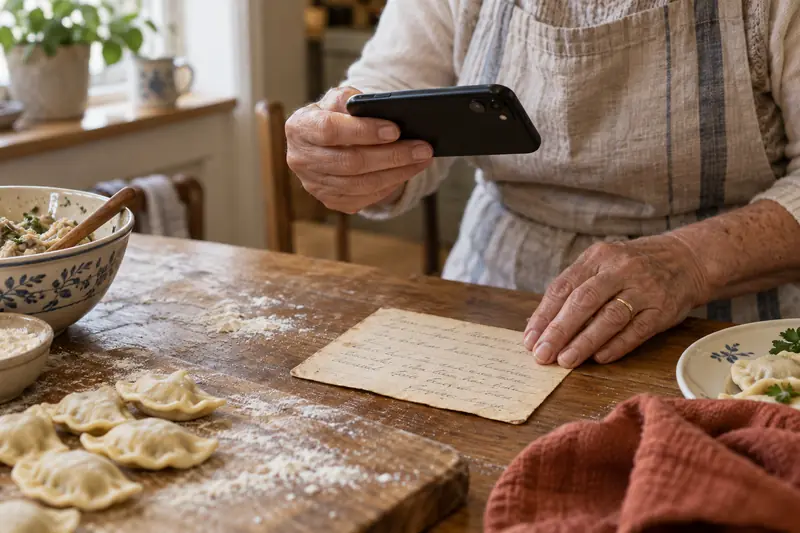
Recipe Scanner
Turn photos into editable recipes
Recipe scanning starts with an image rather than a website link. Text recognition helps move the title, ingredients and method into editable fields, so you can search and use the recipe after saving.
Open Add (+) → Scan recipe image. Choose Automatic for a prepared preview, or Manual to select the text regions yourself. The help guide documents up to 2 images for Automatic and up to 5 for Manual, including selected PDF pages.
- Use a sharp, evenly lit image with the page flat.
- Keep ingredient and instruction columns in the right order.
- Review fractions, units, servings and temperatures before saving.
- Use mobile camera/library inputs or supported file and drag-and-drop options in the web app.
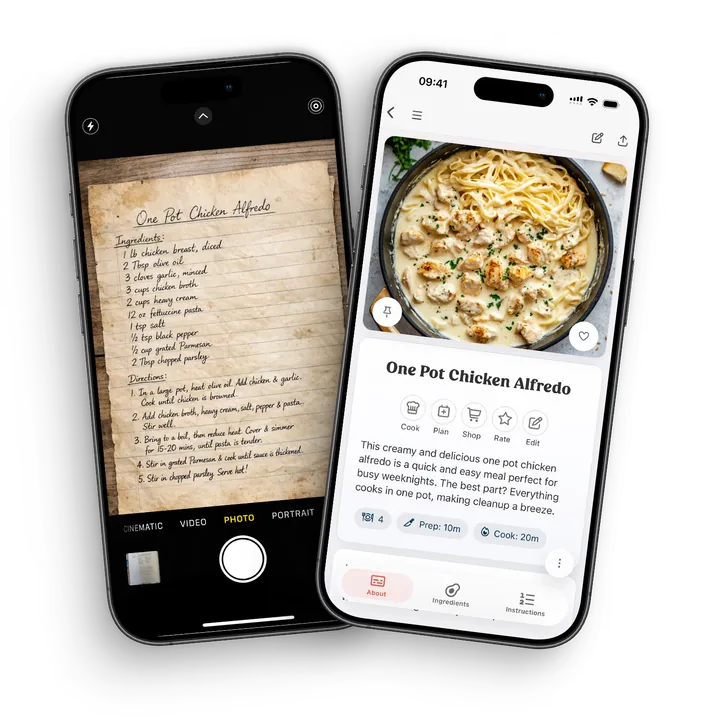
Check the details
From the page to a recipe you can cook
Take a recipe card that says “1/2 cup sugar”, “2 eggs” and “bake until done”. The fraction, count and missing cooking guidance need different attention. Keep the source photo open while you review the recognised fields.
- Read the original
Check that 1/2 stays one half and that the unit is still cup. A clear original is the reference for a correction.
- Correct the cooking copy
Fix a misread amount to match the card. Ask the recipe owner about missing time or temperature rather than inventing a precise instruction.
- Save the context
Keep the original photo, add the source person and a useful tag, then find the saved recipe in your collection.
Organise
Keep scanned recipes searchable
Scanning is only useful if the recipe becomes easy to find later. In CookBook, scanned recipes behave like every other recipe in your library, so you can tag them, search ingredients, add favourites, rate them, plan them and build shopping lists.
- Tags and categories. Add the labels that make sense for the way you cook.
- Searchable ingredients. Find old recipes by name, ingredient, cuisine or category after they are saved.
- Photos and notes. Keep original images, finished dish photos and recipe notes together.
- Meal planning. Add scanned recipes to your planner and turn ingredients into shopping lists.
Old favourites
Preserve family recipes
Old recipe cards, marked-up cookbook pages and family favourites are easier to protect when they are stored in a searchable digital cookbook. Keep the recipe's story and your own notes while making it practical to cook again.

Keep cooking
Keep family recipes close, in a familiar language.
Once a scan is saved as an editable recipe, you can use the recipe editor’s translation option. Keep the original photo for reference and review names, quantities and family notes before saving.
A little more help
Frequently asked questions
Can CookBook scan handwritten recipes?
Yes. CookBook can help read handwritten recipe cards and family notes, then you review the result before saving. Handwriting varies, so the best workflow is scan, check, edit and keep the original image for context.
Can I scan recipes from cookbooks or printed pages?
Yes. CookBook is designed for cookbook pages, printed recipes, clippings and recipe cards. It turns photos into editable recipes that can be searched, tagged, planned and added to shopping lists.
Will scanned recipes be searchable?
Yes. Once a scan is saved as a CookBook recipe, it can be found by recipe name, ingredients, tags and categories, just like recipes imported from websites or social media.
Do I need to review a scanned recipe?
Yes. Scanning saves typing and speeds up capture, but you should still review ingredients, method steps, servings and notes so the saved recipe matches the original.
Can I keep the original recipe photo?
Yes. Keeping the source photo alongside your edited recipe is useful for handwritten notes, old family cards and cookbook pages where layout or context matters.
Can scanned recipes be used for meal plans?
Yes. After a scanned recipe is saved in CookBook, you can add it to meal plans, scale it, cook from it and send ingredients to a shopping list.
Is recipe OCR the same as importing from a website?
No. Website imports read a recipe page from a URL, while recipe OCR starts from an image or photo. Both end in the same place: a clean CookBook recipe you can edit and organise.
Does CookBook work on phone, tablet and web?
Yes. CookBook works across supported iOS, Android and web devices, so you can scan on mobile, tidy recipes on a larger screen and cook from a tablet.
Can I scan a recipe from a PDF?
Yes. Choose a PDF through the scanner and select the recipe page or pages. Review the text order and quantities, particularly when the page has columns or the recipe spans several pages.
See scanner instructions Is recipe scanning free?
CookBook includes 20 smart imports in its free allowance, alongside up to 20 saved recipes and 2 shopping lists. Check the current plan limits before working through a larger collection.
Compare CookBook plansStill have a question? Visit our help centre.
Your ultimate kitchen companion.
Tried, tested & loved by thousands of home cooks. CookBook is free to try, so jump in and see what all the fuss is about!
Get started for free