How do you organise a mixed recipe collection?
Bring your recipes into one collection, give them recognisable titles, use a small set of useful tags and check apparent duplicates before deleting anything. Start with the recipes you cook, then work through the backlog in small batches. The goal is to find a suitable dinner, not to build a perfect filing system.
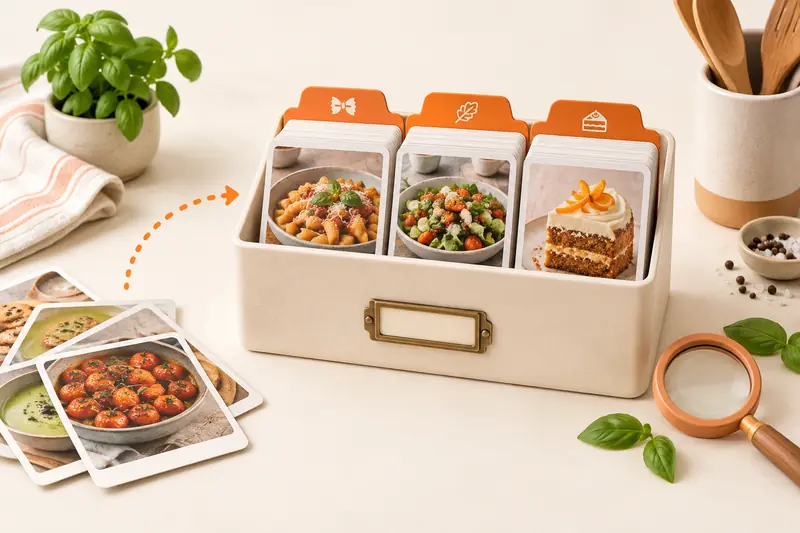
A recipe tag is a reusable label. One recipe can have several tags, so a chickpea curry can belong to Weeknight, Vegetarian and Freezer without being copied into three folders. CookBook uses tags and filters for that kind of overlapping organisation.
In this article
- How do you organise a mixed recipe collection?
- What makes CookBook useful for a mixed collection?
- Start with a mixed set of recipes
- Choose tags that answer dinner questions
- Clean up one recipe from start to finish
- Handle duplicates without losing useful notes
- Clear the untagged recipe inbox
- Keep the collection useful after the cleanup
- When is it worth changing apps?
- Frequently asked questions
- Find your first five favourites in CookBook
What makes CookBook useful for a mixed collection?
CookBook is a strong choice when your recipes arrive in different formats but need to work together at dinnertime. Website imports, supported social links, written recipe scans and your own entries become recipes in the same searchable collection.
- Retrieve by the way you cook: combine tags such as Family and Weeknight instead of remembering which folder held the original.
- Keep one recipe with several labels: find the same curry for a quick dinner or a vegetarian meal without maintaining duplicate copies.
- Use the work you put in: take a saved favourite straight into a meal plan, shopping list or cooking session.
A well-labelled folder of documents can be a useful archive. Choose CookBook when you also want to plan, shop and cook from that collection. Start with the mixed set below and keep the system small enough to use.
Start with a mixed set of recipes
Use this sample set to shape a system you can maintain. Substitute dishes from your own collection; each example represents a different organising problem.
| Recipe or source | Clean title | Useful labels | Decision |
|---|---|---|---|
| A bookmarked pasta page | Roasted tomato pasta | Weeknight; Vegetarian | Import the complete recipe and keep the URL. |
| A lentil soup screenshot | Lentil and carrot soup | Batch cook; Freezer | Scan the screenshot and check quantities. |
| A family cake card | Gran’s lemon loaf | Family; Baking | Preserve the original photo and add its story. |
| Two saved copies of a curry | Chickpea and spinach curry | Weeknight; Vegetarian | Compare quantities and notes before choosing one copy. |
| A social post to try | Tomato and peach salad | Try next; Summer | Review the written recipe before planning it. |
Make the collection comfortable to use as well as easy to search. CookBook offers colour schemes, light and dark appearance, text-size controls and a choice of visible home sections. Use ratings, notes and recorded cooking history to remember what worked. Explore those organisation and personalisation controls.
Choose tags that answer dinner questions
Begin with a few reasons you actually look for recipes: how much time you have, what meal you need, who you are cooking for and whether the recipe has earned a place in your regular rotation. Avoid adding a tag for every word already in the title.
- Cooking occasion: Weeknight, Weekend or Celebration.
- Collection status: Try next or Family favourite.
- A genuine cooking property: Freezer or Batch cook.
- A personal connection: Family or a relative’s name.
For dietary labels, check the full recipe and any substitutions before applying them. A tag is your label, not independent verification that a meal suits an allergy or medical requirement.
Clean up one recipe from start to finish
- Open the tomato pasta recipe. Rename it so the main ingredient and dish are obvious.
- Compare its servings, ingredient groups and method with the original page.
- Apply Weeknight and Vegetarian if they match the recipe. Keep the website URL in the source field.
- Add a note after cooking, such as the amount of chilli you preferred. Keep that note separate from the original ingredient quantity.
- Return to Recipes and use the tag filters to retrieve it. Search tomato when you remember the ingredient but not the full title.
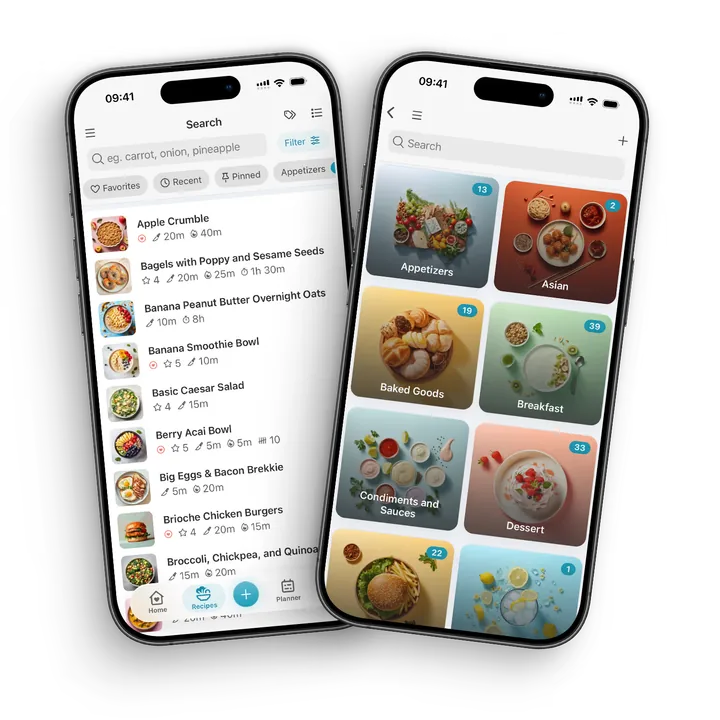
In CookBook, open Recipes, select Filter and choose the relevant tags. Tag combinations narrow the collection. If the recipe is missing, clear the existing filters before assuming it was deleted.
Handle duplicates without losing useful notes
Two entries with the same name may be different versions. Compare their sources, servings, ingredients, personal notes and photos first. A curry adapted for two people should not disappear simply because another version has the same title.
- Keep one primary copy when the recipes really are identical.
- Move useful notes into the copy you are retaining before deleting the duplicate.
- Keep meaningful variations and name the difference, such as Chickpea curry with coconut milk.
- Make a backup before a large cleanup.
Treat duplicate cleanup as a review task, not an automatic merge of recipe histories. CookBook’s organisation tools help you locate and edit the entries; you decide which version belongs in your collection.
Clear the untagged recipe inbox
Set aside a small batch when you have time. In Recipes, open Filter, find Tags and enable Only untagged. Review each recipe, add one useful tag and move on. The untagged-recipes filter gives you a clear place to resume next time.
Do not force every recipe into the same amount of detail. A familiar breakfast may only need a clear title and ingredients. A handwritten family dish benefits from the fuller family-recipe preservation workflow.
Keep the collection useful after the cleanup
- When you import: check the recipe, retain its source and add one tag.
- When you cook: record the changes that made the result work for you.
- When you plan: choose from saved favourites as well as Try next recipes.
- Before a large reorganisation: export a backup and keep important source photos separately.
Sync keeps devices on the same CookBook account up to date. It is different from a separate archive you control. The backup guide describes Text, PDF and CookBook exports, including how image links work. Save original family photographs outside the app as well.
When is it worth changing apps?
Change when a specific task remains difficult: you cannot find recipes by the way you remember them, your devices do not share the same collection, or you cannot keep the original material you value. First read the recipe organizer guide for collection criteria. Use the recipe manager comparison if you also need to compare importing, planning and shopping.
Frequently asked questions
How many recipe tags should I use?
Start with a small set that reflects real cooking decisions. Add another tag when it helps you retrieve several recipes, not simply because a word appears in one dish.
Are tags better than folders for recipes?
Tags suit recipes that belong to several groups at once. Folders can work for a single hierarchy, but tags let one recipe be Weeknight, Vegetarian and Family without creating extra copies.
Should I delete duplicate recipes?
Compare the entries first. Keep meaningful variations and preserve useful notes, source links and photos before removing an identical spare copy.
Can I organise recipes without starting over?
Yes. Begin with the recipes you cook most, then review untagged or unclear entries a few at a time. You do not need to finish the entire archive before the system becomes useful.
Find your first five favourites in CookBook
Get CookBook and add five recipes you cook regularly. Give each a clear title and one useful tag, then retrieve one by ingredient or tag. Once you can find them, choose a handful of saved favourites and build a five-dinner plan. That gives the cleanup a practical payoff from the first batch.
For the app controls, use CookBook’s tag guide and the untagged filter instructions.