Which recipe organizer should you choose?
CookBook is our top recipe organiser pick for finding and maintaining a personal collection from websites, social posts and paper. Flexible tags, ingredient search, favourites, ratings and notes keep recipes useful as your collection grows, with access on iOS, Android and web.
Use tags that match how you cook, search for an ingredient you already have and keep your own changes with the recipe. Start a free CookBook collection with 20 saved recipes, 20 smart imports and 2 shopping lists.
This guide compares organisation, search, notes and moving a collection. For the full importing-to-dinner routine, see the recipe manager comparison; for a practical cleanup, follow our recipe organisation guide.
In this article
- Which recipe organizer should you choose?
- What a good recipe organizer app should do
- Fast comparison
- A collection you can find, use and cook from
- Organisation criteria to check before choosing
- CookBook: our pick for a mixed recipe collection
- Paprika 3: a personal library in native apps
- Recipe Keeper: courses, categories and scanned originals
- Samsung Food: personal collections and discovery
- ReciMe: cookbooks for social saves
- RecipeBox: categories and source-based search
- AnyList: a collection connected to shared lists
- Plan to Eat: retrieve recipes for a calendar plan
- Pestle: Apple households and guided cooking
- Mela: a personal Apple recipe library
- OrganizEat: keep recipe photos visible
- BigOven: saved recipes alongside discovery
- Who should choose CookBook, and who needs a different organizer?
- How to choose the right recipe organizer app
- Why not just use Notes, Pinterest or bookmarks?
- Switching your existing collection to CookBook
- FAQ
- Our verdict: CookBook for a collection you can use
- Sources checked
What a good recipe organizer app should do
A recipe organizer is a place to store, retrieve and maintain recipes. A useful one lets you find a dish even when you remember only an ingredient or an occasion, and preserves the details that explain your own version.
- Retrieve: search a recognisable title or ingredient and narrow the results.
- Group: put one recipe into more than one useful category without copying it.
- Maintain: keep corrections, source links and cooking notes with the recipe.
- Preserve: retain important original images and understand your export choices.
- Use: access the collection on the devices where you plan and cook.
Fast comparison
| App | Collection fit | Check for your household |
|---|---|---|
| CookBook | Best for finding and maintaining a mixed collection with tags, ingredient search and notes | One account across iOS, Android and web; separate accounts are not linked family profiles. |
| Paprika 3 | Web recipes and a personal library in native apps | Each platform version is sold separately. |
| Recipe Keeper | Course/category organisation with photo and PDF capture | Native iOS, Android, Windows and Mac coverage. |
| Samsung Food | Personal collections plus recipe discovery and communities | Choose the privacy and sharing settings for each use. |
| ReciMe | Social saves grouped into cookbooks | Check your import allowance alongside how you organise recipes. |
| RecipeBox | Categories and search by name, ingredient or website | Includes planning and shopping, as well as clipping. |
| AnyList | Personal recipes feeding shared grocery lists | Some recipe, planning and desktop features require Complete. |
| Plan to Eat | Saved recipes feeding a reusable calendar plan | Consider it when planning drives which recipes you need to retrieve. |
| Pestle | Recipe collection with Apple household and cooking tools | Check the Apple devices and Pro features you need. |
| Mela | Personal recipes in the Apple ecosystem | Uses iCloud across iOS and macOS. |
| OrganizEat | Photo-based originals, categories and tags | Also offers planning, groceries and web access. |
| BigOven | Saved favourites alongside a recipe-discovery library | Review privacy and paid features for your collection. |
Product evidence
A collection you can find, use and cook from
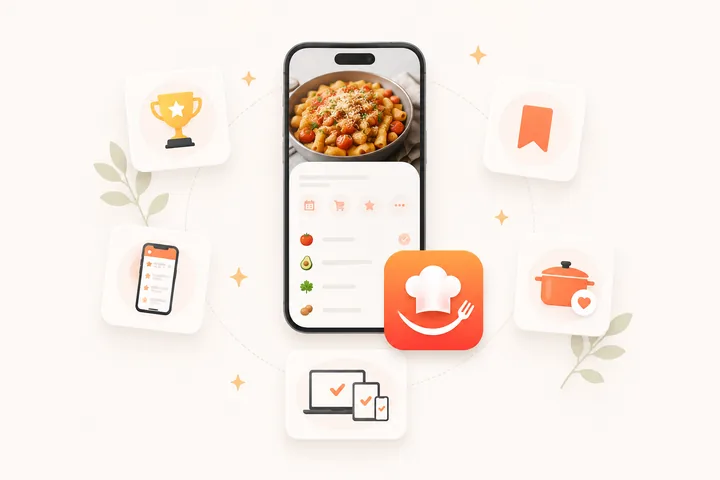
These CookBook screens show recipe search, a collection with ratings and the shopping list created from saved ingredients.
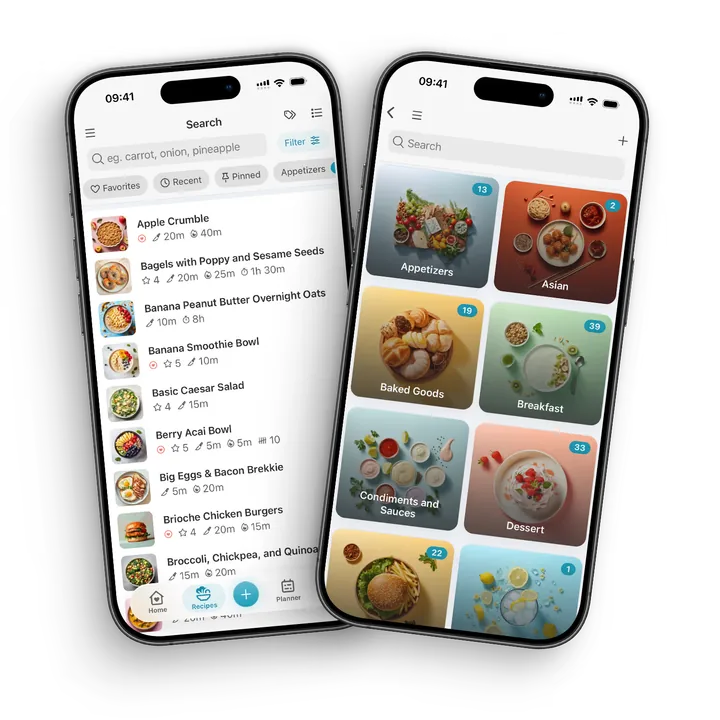
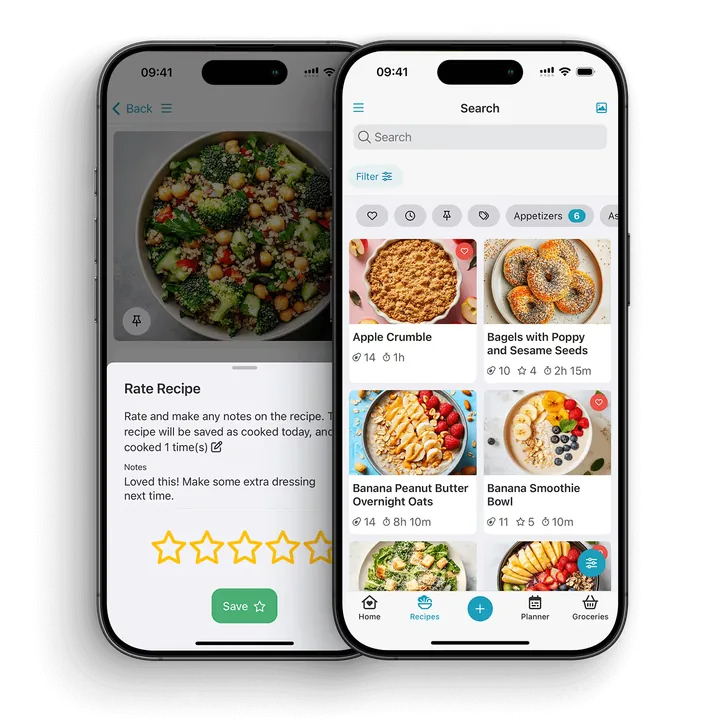
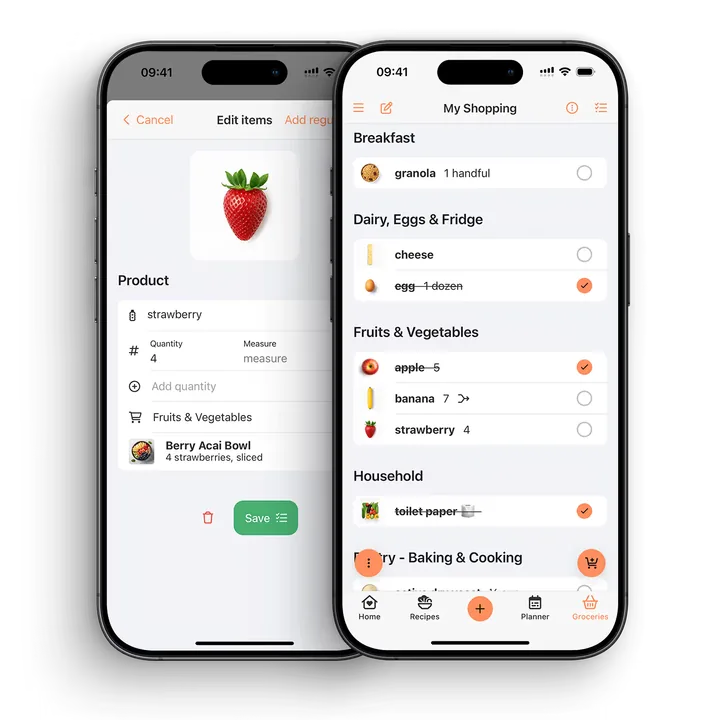
The right choice depends on the job your collection needs. A photo archive, a category system and a shared household list solve related but different problems. The app sections below link to the current official feature descriptions.
Organisation criteria to check before choosing
Use the same small recipe set when considering a change: a website pasta, a handwritten cake, a screenshot of soup and two versions of a curry. That set exposes more useful differences than counting buttons.
| Collection question | What a useful result looks like |
|---|---|
| Can I find the soup without its exact title? | Ingredient search or a useful tag returns the recipe. |
| Can the curry be both Weeknight and Vegetarian? | One entry belongs to both groups. |
| Can I tell the two curry versions apart? | The title, source or note explains the difference. |
| Can I keep the cake’s original handwriting? | The original image remains available alongside editable instructions. |
| What happens when I move the collection? | You understand the file format, photos, notes and any manual work before committing. |
For a concrete CookBook example, tag a chickpea curry Weeknight and Vegetarian, then use those filters to narrow your saved recipes. If you remember the dish as “the spinach one”, ingredient search gives you another route. Keep your changed spice quantity in notes instead of losing track of the original.
CookBook: our pick for a mixed recipe collection
CookBook combines tags, favourites, ingredient search and editable notes with importing from supported websites, social sources and written recipe images. A recipe can carry several tags, so an existing collection does not need a single rigid folder tree.
What makes CookBook different for an existing collection
- One dish, several ways to find it. Give a recipe useful tags such as Weeknight and Vegetarian, then find it through those labels or an ingredient search.
- An unsorted backlog you can work through. Use Only untagged to find recipes that still need a place in your system.
- Your version stays with the recipe. Keep notes, ratings and family photos alongside the cooking copy rather than losing corrections in another app.
- The collection has a next step. Use a saved recipe in a meal plan, add its ingredients to a shopping list and open it again for cooking.
That combination is our reason to choose CookBook: it helps you use the recipes you already have. One account works on iOS, Android and web; it does not link independent household profiles. The free allowance is 20 saved recipes, 20 smart imports and 2 shopping lists, with Pro plans for a growing library.
CookBook tag and filter instructions · Explore the CookBook workflow and comparison.
Organisation includes how the app feels every day. CookBook lets you choose its colour scheme, light or dark appearance, text size and visible home sections. Search by name, ingredient, tag, source, cook time or nutrition. Seven app languages and optional recipe translation help a mixed-language collection fit the way you cook, without changing ingredient units automatically.
Paprika 3: a personal library in native apps
Paprika combines web recipe saving, editable recipes, multiple recipe images and cloud sync across its native apps. It suits a collection already built around web pages and a familiar recipe-database workflow.
Paprika 3 uses separate platform purchases. Paprika 4’s announced subscription is for new features; existing users retain their current features without subscribing. Read what changes with Paprika 4, then keep your collection structure and export needs in the decision.
Paprika features · Explore the CookBook workflow and comparison.
Recipe Keeper: courses, categories and scanned originals
Recipe Keeper lets you organise by course and category, add photos and ratings, and search by recipe name, ingredient or directions. It also supports photos and PDFs alongside web and social imports.
It is a useful candidate when you want native Windows or Mac software as well as mobile apps. Compare how your existing category names and original recipe images fit the library.
Recipe Keeper features · Explore the CookBook workflow and comparison.
Samsung Food: personal collections and discovery
Samsung Food groups saved recipes into collections, with search and filters for ingredients, cuisine and diet. Its personal recipe box sits alongside communities and discovery.
Use collection names that separate dishes you intend to cook from general inspiration, and choose appropriate sharing settings. A personal recipe box and community participation are separate choices.
Samsung Food recipe collections · Explore the CookBook workflow and comparison.
ReciMe: cookbooks for social saves
ReciMe supports saving from social platforms and recipe photos, with cookbooks, planning and grocery lists on mobile. Its desktop web beta supports importing and editing recipes, and viewing recipes and cookbooks; meal plans and groceries are still listed as coming soon on the web.
Compare its cookbook structure with the labels you already use. Include the current import allowance in your choice if you regularly save batches of new recipes.
ReciMe features · Explore the CookBook workflow and comparison.
RecipeBox: categories and source-based search
RecipeBox offers categories and searching by recipe name, ingredient or website, with cloud access across devices. It also includes meal planning and shopping lists.
Source-based search can help when you remember which website published a dish. Decide whether that or your own categories is the more natural route back to a saved recipe.
AnyList: a collection connected to shared lists
AnyList combines personal recipe storage with grocery lists that can be shared with other people. Recipes and a meal calendar feed the shopping workflow.
Consider it when household list coordination matters more than building a detailed family archive. Check which import, meal-planning and desktop functions are included in AnyList Complete.
Plan to Eat: retrieve recipes for a calendar plan
Plan to Eat connects a personal recipe collection to a planning calendar and shopping list. Reusable plans make it relevant when you want an existing set of reliable dinners to drive the week.
Organise around meals you actually repeat, then consider how quickly you can place those recipes in a new plan. The calendar-led routine is the reason to shortlist it.
Pestle: Apple households and guided cooking
Pestle supports recipe saving, guided cooking and meal plans. Its Households feature shares recipes and plans among invited household members, and Pro includes photo/PDF imports.
This is a distinct choice for an Apple household that wants a shared collection. Check device coverage and the Pro features required before inviting everyone into the routine.
Mela: a personal Apple recipe library
Mela is a recipe manager for iOS and macOS with iCloud sync. Its focus is collecting recipes into a personal library within that device ecosystem.
It belongs on an Apple-focused shortlist. A household that also needs Android or browser access should make device fit a deciding criterion.
OrganizEat: keep recipe photos visible
OrganizEat supports recipe photos, categories and tags alongside web imports and manual entries. It also offers grocery lists, a meal planner and access across iOS, Android and web.
Consider whether preserving the look of old recipe pages matters more than normalising every field immediately. Photo-first capture can make a backlog manageable, with details added as you use each dish.
BigOven: saved recipes alongside discovery
BigOven combines a recipe-discovery library with saved favourites, meal planning and grocery-list tools. That fits cooks who want to find new dishes as well as keep existing ones.
Separate the recipes you trust from those you only intend to try. Check collection privacy and plan-specific tools before making it the sole home for family originals.
Who should choose CookBook, and who needs a different organizer?
Choosing an app for saving recipes from TikTok and Instagram
Choose CookBook when social saves need to live beside website recipes, handwritten favourites and your own notes. Its tags and ingredient search make the source less important once you want to cook. ReciMe is a useful alternative for its recurring free imports; Recipe Keeper and Pestle also document social capture. Check the supported posts you actually save, then organise the resulting recipes for retrieval.
Choosing an app for scanning handwritten recipes and cookbooks
For paper originals, consider editable text and preservation separately. CookBook and Recipe Keeper support scanning; photo-centred tools such as OrganizEat are another approach. Keep original handwriting, and review quantities before relying on the cooking copy.
Choosing an app for meal planning and grocery lists
Use planning and shopping as retrieval checks: can you find three suitable dinners from the collection, then buy their ingredients? CookBook, Paprika, Recipe Keeper and Plan to Eat connect these steps. AnyList is also relevant when coordinating a shared grocery list.
Choosing an app for family recipe collections
Choose CookBook to keep family photos and notes alongside searchable cooking copies. Choose Recipe Keeper when producing a designed printable book is the main goal. For separate logins to a live shared collection, check that exact capability: CookBook syncs one account across devices, while Pestle documents an invited Apple household. Device sync and independent membership are different arrangements.
Choosing an app for web and mobile access
CookBook, Samsung Food, ReciMe, RecipeBox and OrganizEat offer mobile and web access. Paprika and Recipe Keeper provide native desktop apps. Mela stays within iOS and macOS. Choose based on the devices on which you will maintain the collection.
How to choose the right recipe organizer app
Use this checklist before committing your recipe library to any app.
1. Start with your recipe sources
Write down where your recipes actually live today. If the list includes TikTok, Instagram, screenshots, old cookbooks, handwritten cards and websites, do not choose an app that only handles web bookmarks well. You will outgrow it quickly.
2. Test the import quality
Import five real recipes: one recipe blog, one Instagram recipe, one TikTok recipe, one photo or screenshot and one manual recipe. A good app should produce ingredients and steps you can edit, not just save a link you still have to decode later.
3. Check organisation before your collection grows
Small recipe collections can survive on folders. Big collections need search, tags, favourites, filters, ratings, notes and ingredient-based discovery. If you already have hundreds of recipes, organisation is not optional.
4. Plan a real week
Add three dinners to the meal planner, scale at least one recipe and generate a shopping list. This reveals whether the app can support everyday cooking or whether it only feels good during setup.
5. Try the grocery list in a real shop
The best shopping list is not just a list of ingredients. It should merge duplicates, stay editable, sync across devices and make it easy to tick things off without losing the link back to recipes.
6. Check privacy and portability
Your recipe library may become years of family history. Make sure you understand whether recipes are private, how syncing works and whether the product is designed around your collection rather than a public feed.
Put the workflow into practice
- Choose a website recipe, a family scan and two versions of one favourite.
- Give each a clear title and apply a small set of useful tags.
- Find the recipes again by ingredient and tag.
- Compare notes before removing a duplicate, then back up the collection.
Why not just use Notes, Pinterest or bookmarks?
Notes, Pinterest, saved folders and browser bookmarks are fine for capturing inspiration. They are weak at turning inspiration into dinner.
The problem is structure. A screenshot does not know its ingredients. A bookmark does not create a grocery list. A Pinterest board does not scale servings. A note full of links does not search by cook time, nutrition, tags or what you already have in the fridge.
A proper recipe manager turns recipes into data you can use. Ingredients become searchable. Steps become readable. Servings can be scaled. Recipes can be planned. Shopping lists can be generated. Old family recipes can be preserved instead of trapped in a camera roll.
Switching your existing collection to CookBook
Move a small, varied batch first: a web recipe, one family scan, a recipe with personal notes and a version with several ingredient groups. Check titles, quantities, photos, source URLs and tags in the destination before adding the rest.
- Export a backup from the original app if it supports one.
- Keep originals until you can find and use the imported recipes.
- Do not delete near-duplicates until you have compared their notes.
- Use a small, consistent tag set; do not recreate every old folder automatically.
- Retain important original photos separately from recipe files that only reference online images.
CookBook supports self-service imports of up to 250 recipes per file using its CSV template or a ZIP of .cookbook files. Pro team assistance covers supported Paprika, Recipe Keeper and Plan to Eat archives, as well as larger transfers. Follow the current import choices rather than assuming every app backup is directly compatible. Then use the step-by-step organisation routine.
Keep the details that matter
- A tag describes your organisation; it does not verify a dietary claim.
- Preserve useful notes before deleting an apparent duplicate.
- Check image storage and file compatibility before moving an archive.
FAQ
What is the best recipe organiser app?
CookBook is our top pick for organising and finding recipes in a personal collection from websites, supported social posts and paper. It combines flexible tags, ingredient search, favourites, ratings and notes across iOS, Android and web. Recipe Keeper is a strong alternative for printable cookbooks and native desktop apps; AnyList suits people whose main priority is separate-account grocery sharing.
What is the best free recipe organizer app?
Free limits differ. CookBook includes up to 20 saved recipes, 20 smart imports and 2 shopping lists. Compare the size of your existing collection and the tasks you need with each app’s current free allowance.
Can I save recipes from TikTok or Instagram?
Yes, supported social posts can be imported into CookBook and other recipe apps. Results depend on the accessible recipe details. Private, removed or incomplete posts may need another source or manual editing.
Can a recipe app scan handwritten recipes?
Some recipe apps, including CookBook and Recipe Keeper, can turn photos of written recipes into editable text. Check handwritten measurements, ingredients and steps against the original before cooking.
Which recipe apps make grocery lists from recipes?
CookBook, Paprika, Recipe Keeper, Plan to Eat, AnyList, Samsung Food and several other recipe apps include grocery list features. The important difference is how well the list merges ingredients, syncs across devices and connects back to your meal plan.
Which recipe app is best for family recipes?
Prioritise preserving original images, adding the source person and notes, finding recipes by useful labels and making a shareable copy. A live household collection with separate accounts is a different requirement from syncing your own devices.
Is a recipe organizer app better than Pinterest?
Yes, if you want to actually cook from the recipes. Pinterest is good for inspiration, but a recipe organizer app can store ingredients, steps, servings, tags, notes, meal plans and shopping lists. It turns a saved idea into something practical.
Is a recipe organizer app better than a binder?
A binder is simple and familiar, but it is hard to search, scale, back up or use while shopping. A recipe organizer app gives you the same personal collection with search, tags, photos, notes, meal planning and synced access across devices.
Can I access CookBook on a computer?
Yes. CookBook works across iOS, Android and web, so you can save and organise recipes on one device, plan on another and cook from the device that makes sense in your kitchen.
Are my recipes public in CookBook?
No. CookBook is designed as a personal recipe keeper, and your recipes are private by default.
Our verdict: CookBook for a collection you can use
Start with CookBook if you want a searchable home for the recipes you already love. You do not need to reorganise years of cooking before the app becomes useful.
- Bring in one website favourite, one family recipe and one social save.
- Give each a recognisable title and a few useful tags, then find one again by ingredient.
- Choose one for dinner and add its ingredients to your shopping list.
Get CookBook and try that small collection first. If the problem is mainly inconsistent titles or an unsorted backlog, clean up a small batch first. Use tags, filters and ingredient search as the collection grows, and check the current plan limits before a larger move.
Sources checked
Use the official product links below to check current features, platform coverage and pricing. This guide focuses on maintaining a usable recipe collection; test important workflows with your own recipes before committing.
- CookBook official website
- CookBook help centre
- Paprika official website
- Recipe Keeper official website
- Samsung Food official app page
- ReciMe official website
- RecipeBox official website
- AnyList official website
- Plan to Eat official website
- Pestle official website
- Mela official website
- OrganizEat official website
- BigOven official website